General Remarks
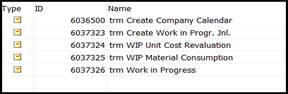
· All TRIMIT objects will start with “trm “
· All TRIMIT fields in table extensions will start with “trm “
· Back to Standard Business Central as much as possible
· Additional TRIMIT options in Standard Business Central option fields are replaced by additional fields
· Some specific TRIMIT functionality is now placed in separate Tables/Pages instead of in Standard Business Central Tables/Pages
· Data Capture not possible yet; this will become a separate TRIMIT Extension/App.
Deleted Functionality
We have been evaluating the TRIMIT functionalities in order to remove the features that have become obsolete or that have an impact on Standard Business Central.
The following features are deleted:
· Pre-Registration of Purchase Invoices
· Extended Payment Conditions
· Retain Sales Orders
· Sub-Supplier Work as an option in the BOM Component Lines
·
Codeunit Calls
Use of subscribers will in many cases be a better solution.
In all TRIMIT objects any Codeunit Call in a procedure has been replaced by a
publisher.
· Pre-Defined fields in many tables. This now needs to be done via Extensions
·
Reports regarding costing have been deleted
· Alternative Sorting in Languages for Care Label Report
· Creation/Changed Dates (Fields of TRIMIT). If necessary, you can use Change Log
· No special Caption for Item Category anymore
· In the Contact, the Customer Type and Vendor Type. If necessary: make Customization
· Field Type in Customer and Vendor. If necessary, make Customization
· When a customer is blocked it was possible to create Quotes. This is no longer an option
· Tariff Numbers – field Conversion Rate
· No Negative Stock possible anymore when posting Transfer Orders
· (Sales) Posting Journal
· Tasklet Factory changes and objects
· Include Credit Memo in Finance Charge Terms
· Parameter Time of Availability Check in the Sales & Receivables Setup has been deleted. The Availability Check will always automatically be carried out when you change a value at the Sales Lines that influences the Availability.
Replaced Functionality
·
TRIMIT Standard Unit Cost Globally is replaced by standard Business Central Costing Method Standard
on Master/Item. Therefore, costing principles back to standard Business Central.
But we will keep the Calculated Unit Cost fields in Items as a base for
(Standard) Unit Cost and can still use report Unit Cost Revaluation Report
for revaluation.
·
Inventory Posting Setup – all TRIMIT fields
besides Configuration Variance Value have been deleted. Production
Postings will now be posted to the standard Business Central G/L Accounts.
This also means that you need to fill the following G/L Accounts in the
Inventory Posting Setup:

· TRIMIT Unit of Measure is replaced by standard Business Central Item Unit of Measure
· Unit Cost Rounding Precision in Inventory Setup is replaced by Unit-Amount Rounding Precision (LCY) from General Ledger Setup
· Codeunit Call Fields (for the captions of i.e. the Item Statistics Groups) is replaced by Caption Class Setup.
·
Replenishment System option Automatic is
replaced by new field Automatic Replenishment.
If you now set a checkmark in Automatic Replenishment you are not
able to enter a Replenishment System. It will be determined
automatically: if there is a BOM it will be handled as Production, if
there is not a BOM, it will be handled as Purchase.
· Company Calendar is replaced by Base Calendar of standard Business Central
·
Sales Price Type options Company Group,
Chain, Bill-to and Campaign Price List are deleted.
If Type is Customer it will search also for Company, Bill-to, Company
Group and Chain.
Campaign Price List is replaced by Type Campaign but will have the
same functionality.
·
Sales Line Discount Type, By Bill-to, By
Company Group, By Chain, By Country will be deleted, but will still be
checked when entering the Discounts per Customer.
The actual Discounts can now only be entered via the Sales Line Discount Types
(not via Master, Item or Customer anymore)
·
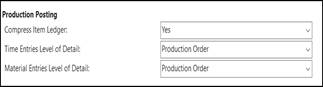
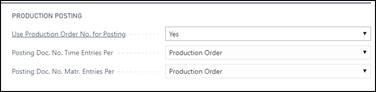
Production Setup fields renamed
· Customer Price Group: TRIMIT Fields are now in separate Table/Page Price Group Parameters and can be entered via the Customer Price Group.
·
Costing Method NINO
is now replaced by (Master/Item) Type Non-Inventory

· Field Priority in Item Vendor removed is replaced by New field Default Vendor
· New report 6036660 trm Adj.Exch.Rates Sales/Purch instead of TRIMIT functionality for adjusting the exchange rated in Sales-/Purchase Documents in standard report 595 Adjust Exchange Rates. This also means, that when updating the Exchange rates, the user first needs to run report 595 and afterwards report 6036660 if he wants to update the Sales-/Purchase Documents as well.
· New report 6037310 trm WhseSource Create Doc. created instead of TRIMIT functionality added to standard report 7305 Whse.-Source - Create Document
· Profile (Role Center) TRM_SB_WEB TRIMIT Small Business WebClient is now renamed to TRM_SB TRIMIT Small Business and replaces the old TRM_SB TRIMIT Small Business
Changed Functionality
· Provision Sales/Purchase - only one combination of Gen. Bus. Posting Group, Gen. Prod. Posting Group and Calculation Base Provision is allowed
·
Calc. Base Calc Unit Cost is now called Base
Calc. Unit Cost Material and the options are reduced:
Old options:
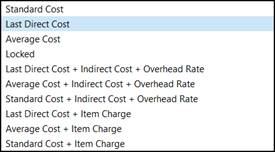
New options:

· Entry Type in transaction Tables back to standard options (Purchase, Sales, Positive Adjmt., Negative Adjmt., Transfer, Output, Consumption).
·
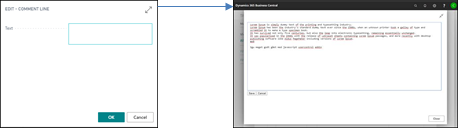 |
The TRIMIT Text Editor in the Modern Client is now much bigger as the small square it was before.
· It is not possible anymore to add a Master that is used as Group Master in the Collection/Master Relation, Shipment Group/Master or Matrix Limitation/Master.
· Parameter Automatic Update Item from Master in the Inventory Setup, will now only show 1 number: the number of fields in the Item that do not have Automatic Update set to No.
· Parameter Automatic Update SKU from Master SKU in the Inventory Setup, will now only show 1 number: the number of fields in the Item that do not have Automatic Update set to No.
New Functionality
·
New procedure for Closing Production Orders.
After the Production Orders have been Finished, you are still able to
post Consumptions for Materials and/or Time. When Closing the Production
Orders, the final variances will be posted to the General Ledger, and you are
not able to post any consumptions to the Order anymore. Only closed Production
Orders can be archived.
Because of this procedure, we also added new Parameters in Production Setup
regarding Closing/Archiving:
- Close Inventory Production Orders at Finishing
- Close Order Production Orders at Finishing
- Automatically Archive Production Orders at Close
· New procedure for Closing Production Orders can also be executed via Closing a Production Collecting Order.
· Replication over databases and Filters for Table Content
· Report 6036650 trm Customer Statement for the Statement (116) when using TRIMIT E-Mail functionality.
· Report 6036651 trm Reminder for the Reminder (117) when using TRIMIT E-Mail functionality.
· Report 6036652 trm Finance Charge Memo for the Finance Charge Memo (118) when using TRIMIT E-Mail functionality.
·
New Parameter Time Rounding Precision (in
hours) in Production Setup.
If empty set to 0,00001
·
Additional Comments can be shown in FactBoxes of
the pages for the Measurement Chart or BOM.
Therefore we also added new fields in the Additional Comments: Show in
Measurement Chart and Show in BOM.
· Master Analysis Matrix – extra option for Only Current Company (in case of Intercompany structure)
·
New Parameter Generate Summary Invoices by
Batch Posting in Sales & Receivables Setup.
If set to Yes, when Batch Posting the Sales Orders, it will create a
Summary Invoice.
· Report 6037061 trm Inventory Valuation WIP now also including filters on Production Orders
· In TRIMIT Production you can now also use the standard Business Central Lot Nos. and Serial Nos. (role administration)
·
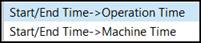
You can now determine if the M/C Factor
in an Operation is related to the Operation Time or Machine Time. Therefore, a
new parameter in the Production Setup: Time Registration Calculation.
· New Profile (Role Center): TRM_PROD TRIMIT Production (page 6036306)
·
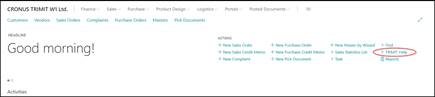
TRIMIT Help based
on W1 in English now available in all TRIMIT Role Centers via a direct
link to
https://help-bc.trimit.com/main.aspx?lang=en-US&content=index.html